
Getting started
PiscaMaps covers over 4,000 public French fishing venues including lakes, rivers and canals across all 96 departments. The map is free to browse, but a membership unlocks the full venue detail panel, shortlists, favourites and the Trip Planner.
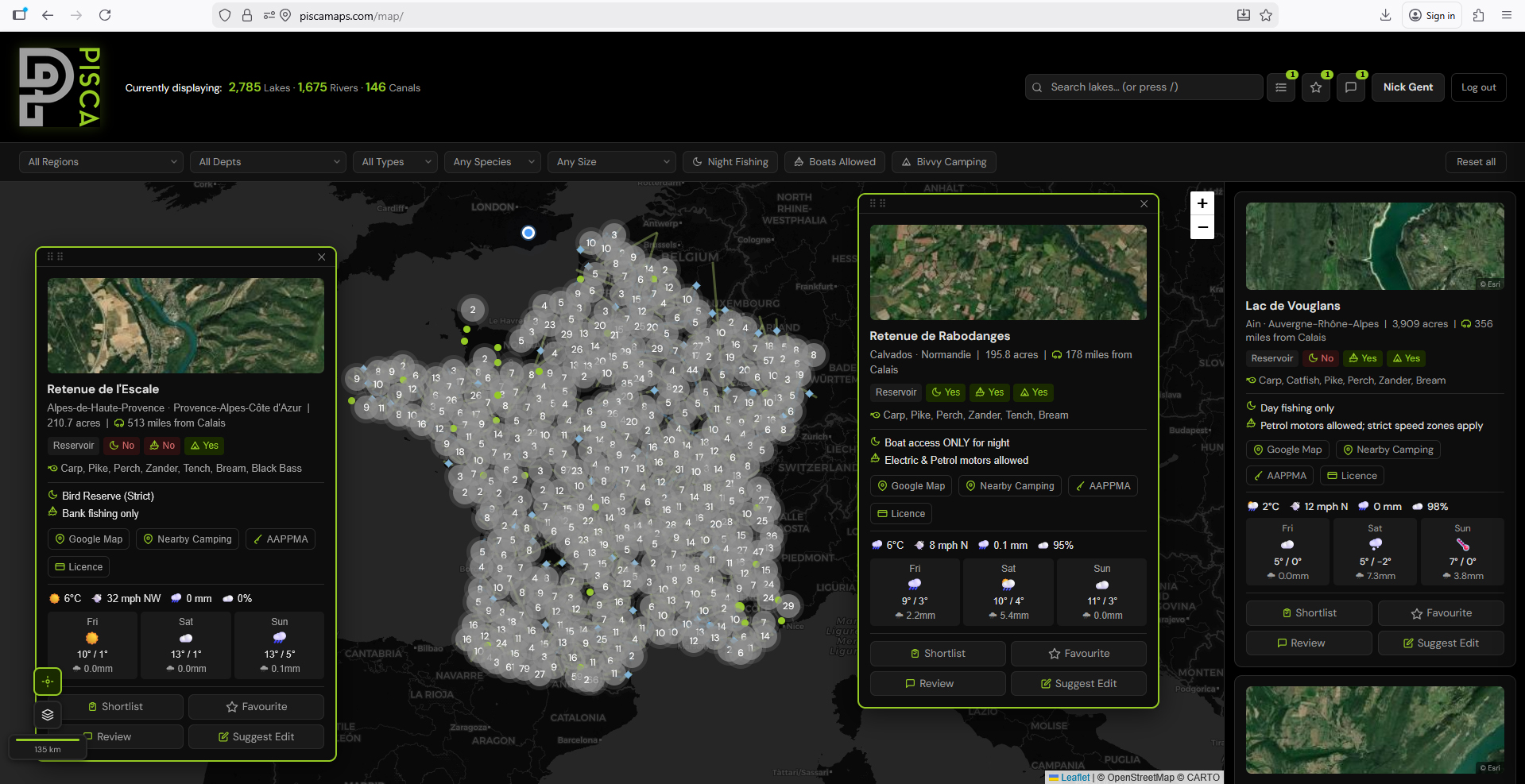
To get started, head to piscamaps.com/map. The map loads centred on France. You can pan and zoom freely, or use the search and filter tools on the left-hand panel to jump straight to the venues you're looking for.
Free vs member access. Free users can see all venue pins on the map and basic information. Members get full venue details, night fishing rules, species lists, bivvy info, shortlists, favourites, and the Trip Planner.
Searching and filtering venues
The left-hand panel contains all the tools for narrowing down venues. You can use these individually or combine them to zero in on exactly what you need.
Search by name or place
Type a lake name, river name, town or department into the search box at the top of the panel. Matching venues appear instantly as you type — click any result to fly to it on the map and open its detail panel.
Filter by water type
Use the water type selector to show only lakes, only rivers, or only canals. By default all types are shown. This is useful when you're specifically looking for stillwater carp venues or a stretch of river for coarse fishing.
Filter by species
Select one or more species — Carp, Pike, Perch, Zander, Catfish, Bream, Tench, Roach and more — to filter the map to venues where those species are recorded. Venue species data comes from the official AAPPMA records for each water.
Filter by rules
Three quick-filter toggles let you filter by venue rules:
- Night fishing — show only venues where overnight fishing is permitted
- Boats permitted — show only venues where boats or float tubes are allowed
- Bivvy camping — show only venues where bivvy camping is allowed on the bank
Filter by region or department
Use the region and department dropdowns to restrict results to a specific area. This is particularly useful if you're planning a trip to a particular part of France and want to see all the options in one area at once.
Use the distance filter. PiscaMaps shows the straight-line distance from Calais for every lake venue. You can filter by maximum distance to find all fishable lakes within a comfortable drive of the ferry port.
Reading a venue info panel
Click any pin on the map or any result in the search panel to open that venue's full detail panel. Here's what each section tells you.
Google Maps link
Every venue panel includes a direct link to open the location in Google Maps. This opens in a new tab and drops a pin at the venue's recorded coordinates — useful for checking access routes, parking and surrounding area before you travel.
Season notes
Season information is shown per-species group, reflecting the official AAPPMA rules for that venue. Some venues have year-round fishing for certain species, while others have closed seasons that vary by department. Always check these before you travel.
Shortlists and favourites
Members can save venues to two separate lists — Shortlist and Favourites — accessible from your profile page at any time.
Add to Shortlist
The shortlist is for venues you're considering for an upcoming trip but haven't committed to yet. Open any venue panel and click the bookmark icon to add it to your shortlist. Use it as a working list you can add to and remove from as you research.
Add to Favourites
The favourites list is for venues you've visited and want to return to, or venues you're certain about. Click the heart icon on any venue panel to add it. Your favourites are always visible on your profile and on the map as distinct pin markers.
View your saved venues
All saved venues are visible from your profile page under the Shortlist and Favourites tabs. Each saved venue shows a summary card with the key details — species, night fishing status, distance from Calais — so you can compare venues without reopening each one on the map.
Using the Trip Planner
The Trip Planner is a members-only tool for organising multi-venue fishing trips. You can create a trip, add venues, plot a route between them, invite fishing partners, and log your catches — all in one place.
Creating a trip
Go to your profile page and open the Trips tab. Click New Trip and give your trip a name and dates. You can add a start location (your home address or port of departure) which is used as the starting point for the route map.
Adding venues
Use the venue search within the trip to find and add venues. Type a lake or river name and select from the autocomplete results. Venues appear as numbered cards within the trip, and their positions are plotted on the trip's dedicated map with numbered pins matching the card order. Drag the venue cards to reorder them and the route updates automatically.
Route map and distances
The trip map shows a route connecting your start location and all venues in order, with driving distances and estimated journey times shown for each leg. Routes are calculated via Mapbox Directions. The total trip distance is shown at the top of the map.
Route line colour. The route line on the trip map is drawn in lime green so it stands out clearly against the Leaflet map background.
Inviting fishing partners
Search for other PiscaMaps members by username and invite them to your trip. They'll receive an email notification and can then view the full trip details from their own profile. You can remove members or leave a trip at any time.
Catch log
Each venue in a trip has a catch log where you can record catches made during the trip. Log the species, weight and the angler who caught it. Catches are visible to all trip members and appear on each member's profile under Reviews.
Ready to find your next French fishing venue?
Join PiscaMaps from £5.95/month and get full access to 4,000+ venues, night fishing rules, species data and the Trip Planner.
Open the mapFrench fishing licences — a quick note
All anglers fishing in France must hold a valid Carte de Pêche, purchased through cartedepeche.fr. You also need to be affiliated with the local AAPPMA (the association responsible for the water you're fishing). PiscaMaps links to the relevant AAPPMA for every venue in the info panel, so you can check affiliation requirements before you travel.
Licence requirements and season dates can change annually. Always verify the current rules with the local AAPPMA before your trip.
Tips for getting the most from PiscaMaps
- Combine filters. For example: Carp + Night fishing + within 200 miles of Calais gives you a focused list of venues for a classic UK angler's French carp trip.
- Check the season before you book. Many French species have closed seasons that vary by department. Use the season notes on each venue panel before committing to dates.
- Use the shortlist during research. Add anything that looks interesting to your shortlist as you browse, then review and narrow down later. It's much easier than trying to remember venue names.
- Start a trip early. Even if you're not travelling for months, creating a trip and adding venues lets you track the planning as it develops and share it with your fishing partners.
- Check the Google Maps link. The satellite view in Google Maps is invaluable for understanding the layout of a venue — where the car park is, access tracks, obvious features and swim positions.